This document provides the steps required of an eShare administrator to link Microsoft Sensitivity Labels to the organization’s eShare tenant for usage with Sharing Policies and Analytics. The following steps will be reviewed:
REQUIREMENT:
The person performing these steps must have an administrator role assignment of Application Administrator, Cloud Application Administrator, or Global Administrator in the destination M365 tenant.
Authorize the Document Labels API
Authorization for Document Labels API allows eShare to read Microsoft Sensitivity Labels deployed in your tenant and the labels applied to documents, SharePoint sites, Teams, Groups, etc.
Navigate to 'Admin Console' > 'Corporate Cloud Providers' tab.
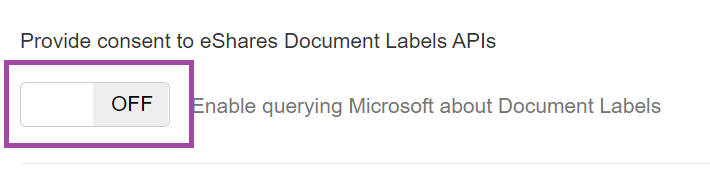
Find the slider for 'Enable querying Microsoft about Document Labels' and enable the switch to 'ON'.
You will be redirected to your Microsoft 365 tenant to sign in, if you are not already signed in.
A prompt is displayed indicating the permissions for which the custom tenant app is being authorized.
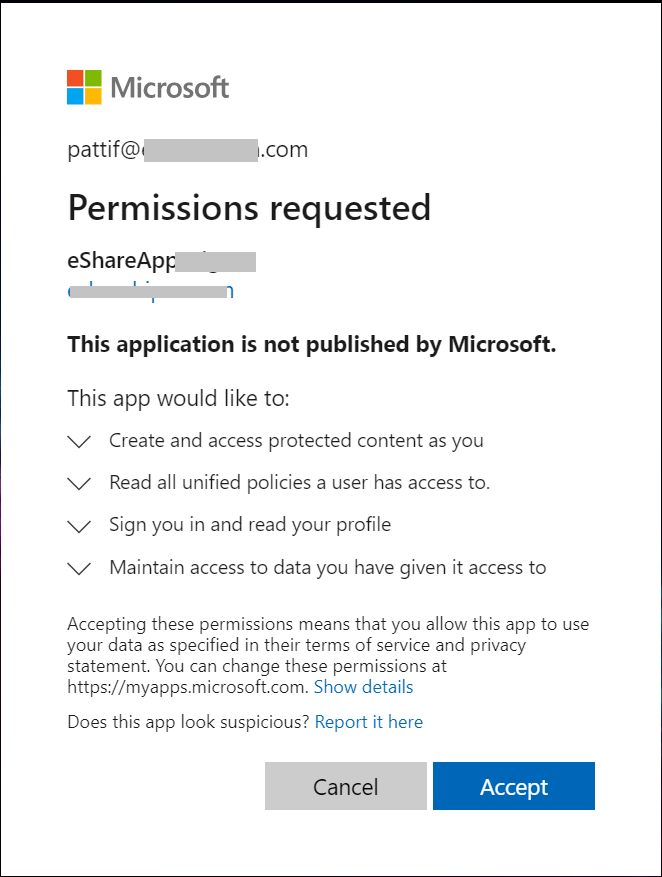
Select the 'Accept' button to continue with the authorization process.
Upon successful completion, you will be redirected back to the eSHARE Admin Console. The feature status should now show 'ON' status.
Switch to the 'Labels and Tags' tab to confirm the MIP labels in your tenant are displayed.