This document describes how to add the five eSHARE classification columns to every SharePoint site, document library and OneDrive in the tenant with the Set-SPOClassificationColumns.ps1 script. SharePoint sites are done first, then OneDrive. Every run produces an Excel report first, and nothing changes until you run it again with -Apply. The following steps will be reviewed:
PREREQUISITES:
The person performing these steps should be a SharePoint Administrator using the computer and certificate set up in Create eSHARE Classify SPO Columns Entra ID App Registration. Agree the decisions before you start, including the default site templates, before the first
-Apply.
What the Deployment Does
Each run first makes sure the tenant's default site templates add the columns to new team and communication sites: it registers eSHARE defaults, or adds the eSHARE site script to your organization's own defaults (see Add the Classification Columns to New Sites). Then, for every site collection, it:
Creates the five site columns in the root site, with fixed names and IDs.
Adds them to the site's Document content type, so libraries created later inherit them.
Adds them to every visible document library in the site and its subsites, and adds Data Sensitivity, Data Classification and Data Attributes to each library's default view.
Each OneDrive is its own site collection with a Documents library, and gets the same treatment. Running the script again is safe: anything already in place is reported as OK and left alone. It skips system libraries such as Site Assets, Style Library and Preservation Hold Library.
Choose How to Split the Rollout
SharePoint sites and OneDrive both need the columns. The script covers SharePoint sites by default, and adds every OneDrive when you include -IncludeOneDrive. Choose one of these approaches:
Approach | How | Suits |
|---|---|---|
Sites first, then OneDrive (recommended) | Follow every section below in order. Sites are done and checked before OneDrive starts. | Most organizations, especially larger ones, or where OneDrive changes need separate sign-off |
Everything in one pass | Add | Smaller tenants that want a single change window |
OneDrive in batches | After the sites, run the OneDrive commands with | Organizations that roll out to user groups in stages |
Save the Deployment Script
Go to Deployment Script at the end of this article, expand the script block and select the copy button in the top-right corner of the code.
In PowerShell 7, save what you copied as Set-SPOClassificationColumns.ps1:
Get-Clipboard -Raw | Set-Content -Path C:\eSHARE-Classification\Set-SPOClassificationColumns.ps1 -Encoding utf8Confirm the script saved correctly. This shows the script's description:
Get-Help C:\eSHARE-Classification\Set-SPOClassificationColumns.ps1Run the Report for SharePoint Sites
Open PowerShell 7 and run the script in Report mode:
Set-Location C:\eSHARE-Classification
Import-Module PnP.PowerShell
.\Set-SPOClassificationColumns.ps1 -ConfigFile .\Contoso\contoso.tenant.json
Check the first lines of output: they show the configuration file, tenant folder and column file in use. If any is wrong, stop the script with Ctrl+C.
When the run finishes, open the report: Contoso\SPO-Provisioning\SPO-Provisioning-contoso-[date]-[time]-Report\SPO-Provisioning.xlsx.
Sheet | What it shows |
|---|---|
Summary | Counts of Planned, Done, Conflicts, Skipped and Errors, and one 'New sites' row per site type for the default site templates |
Actions | Every change, per site and library, with the status Planned (Report), Done (Apply) or OK (already in place) |
Conflicts and errors | Existing columns that need a decision, and sites the script couldn't reach |
Note:
To try a single site first, add
-SiteUrl "https://contoso.sharepoint.com/sites/TestSite"(contoso.sharepoint.us in GCC High). A single-site Apply still registers the tenant-wide default site templates.
Review Conflicts
A conflict is an existing column that clashes with one of the classification columns, usually one created by hand or by another tool. The Apply commands in this article give a fixed answer for each kind, so the run doesn't stop to ask:
Conflict | Answer in the Apply command | What happens |
|---|---|---|
A library column with the same internal name, e.g. a DataClassification column created on one library |
| The values are backed up, the column is swapped for the standard site column, and the values are restored. Files' 'Modified' dates don't change. |
A column with the same display name but another internal name, e.g. Data Sensitivity stored as eShareLabel |
| The library is left alone for that column, so eSHARE can't write to it there. Contact eSHARE support to resolve it. |
A site column with the right internal name but a different ID | Asked during the run | Choose 'Keep' to use the existing site column. Nothing is deleted. |
Before the script moves or deletes any value, it saves the values to a CSV file in the run's Backups folder.
Apply the Columns to SharePoint Sites
Run the same command with
-Applyand the conflict answers:
Set-Location C:\eSHARE-Classification
Import-Module PnP.PowerShell
.\Set-SPOClassificationColumns.ps1 -ConfigFile .\Contoso\contoso.tenant.json `
    -Apply -SameNameAction Replace -SameLabelAction Skip
Wait for the run to finish. As a guide, about 500 site collections take around 35 minutes.
Open the Apply report and check the 'Conflicts and errors' sheet. Locked or read-only sites return 403 Forbidden and are skipped.
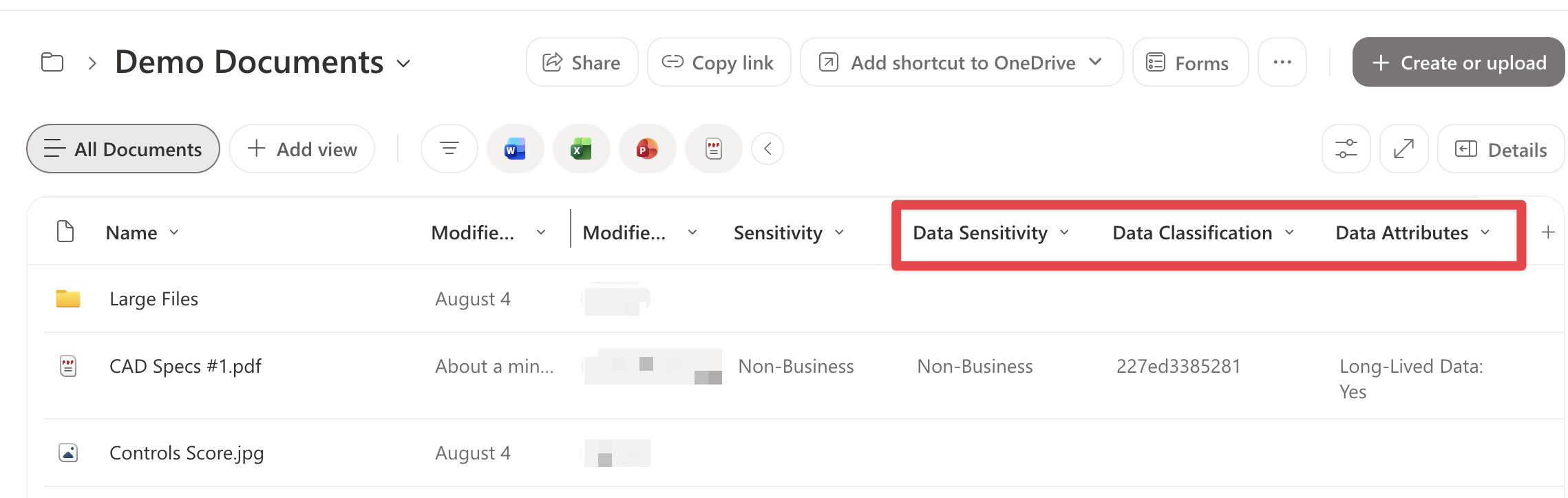
Open a library and confirm that the 'Data Sensitivity', 'Data Classification' and 'Data Attributes' columns are shown.
Add the Columns to OneDrive
Adding -IncludeOneDrive covers every OneDrive. The run also re-checks the SharePoint sites, which show as OK. Expect it to take longer than the sites, as each user has their own OneDrive.
Run the Report with
-IncludeOneDrive:
Set-Location C:\eSHARE-Classification
Import-Module PnP.PowerShell
.\Set-SPOClassificationColumns.ps1 -ConfigFile .\Contoso\contoso.tenant.json -IncludeOneDrive
Review the report as you did for the sites.
Run the Apply:
.\Set-SPOClassificationColumns.ps1 -ConfigFile .\Contoso\contoso.tenant.json -IncludeOneDrive `
    -Apply -SameNameAction Replace -SameLabelAction Skip
Check the 'Conflicts and errors' sheet. Expected errors:
403 Forbidden on some OneDrives, e.g. those of departed users.
An unauthorized operation or storage limit error on a OneDrive that is read-only or full.
Sign in as a test user, open 'OneDrive' > 'My files', select a file and open 'Details'. The 'Properties' section lists 'Data Sensitivity', 'Data Classification' and 'Data Attributes'.
Note:
To roll out OneDrive in batches, add
-SiteUrlwith the OneDrive addresses to both commands, e.g.-SiteUrl "https://contoso-my.sharepoint.com/personal/jane_contoso_com", "https://contoso-my.sharepoint.com/personal/sam_contoso_com". In GCC High, OneDrive addresses end in -my.sharepoint.us. In OneDrive, users see the classification in a file's Details pane and can filter by it. The newer OneDrive layout doesn't show custom columns in the file list.
Confirm the Deployment
Run the Report again with
-IncludeOneDrive(without-Apply).In the 'Summary' sheet, confirm that Planned is 0, Conflicts is 0, and the three 'New sites' rows show OK.
If Planned isn't 0, check the rows in 'Actions'. OneDrives that can be read but refuse changes always show as Planned; they match the errors from the Apply run and can be left.
Deployment Script
Copy the script below with the copy button and save it as C:\eSHARE-Classification\Set-SPOClassificationColumns.ps1. Without
-Applyit only reports; with-Applyit makes the changes.
Expand this block and copy the Set-SPOClassificationColumns.ps1 script below
<#
.SYNOPSIS
Pre-creates the eSHARE classification columns (default: "Data Sensitivity" / DataSensitivity,
"Data Classification" / DataClassification, "Data Attributes" / DataAttributes,
"eSHARE_GUID" / eSHARE_GUID and "Data Sensitivity Id" / DataSensitivityId) as site columns in
every site collection, attaches them
to each site's Document content type so new libraries inherit them, and adds them to every existing
document library and its default view. Conflicting columns are reported and handled per your choice.
.DESCRIPTION
Runs in two modes:
Report (default) Read-only. Lists every change it would make and every conflict that needs a decision.
-Apply Makes the changes. Prompts for each conflict (or uses -SameNameAction / -SameLabelAction).
Per site collection:
1. Creates each column as a site column in the root web, with a fixed GUID and the exact
internal and display names from the column definitions.
2. Adds the site columns to the root web's "Document" content type (without pushing down), so
libraries created later inherit them.
3. For every visible document library in the site and its subsites:
- adds the columns to the library and to its document content types
- adds them to the library's default view
- handles conflicts (below)
Conflicts, per library and column:
Same internal name, different column (e.g. a library-only "DataSensitivity" created earlier):
Keep keep the existing column; make sure its display name and default view are right (suggested at the prompt)
Replace back up values, delete the existing column, add the site column, restore values
Skip leave the library untouched for this column
Same display name, different internal name (e.g. "Data Sensitivity" stored as eShareLabel):
Rename rename the existing column to "<display name> (<internal name>)", then add the site column (suggested at the prompt)
Migrate add the site column, copy the existing values into it, back them up, then delete the existing column
AddAnyway add the site column alongside; the library ends up with two columns with the same label
Skip leave the library untouched for this column
Every value that is moved or deleted is first written to a CSV backup in the run's output folder.
Library vs default view: a column can be on the library (values stored, shown in the details pane,
used by search and DLP) without being in the library's default view (what the file list, Sort by and
the filter pane show). In the newer OneDrive web layout, sorting rewrites the default view and drops
custom columns from it; the values are not affected. For a column already on a library, the run checks
content types and default view separately: Report shows "missing from default view" as Planned, Apply
re-adds it, and a library with nothing missing is reported OK.
New sites (mandatory, every run): makes sure the tenant's default site templates for team sites (with
and without a group) and communication sites run the site script "eSHARE classification columns", built
from the column definitions, so new sites get the columns in their Documents library. Report lists what
it would register or update; Apply does it. An existing default from someone else stays the default and
gets the site script added. Results are on the console, the Actions sheet and the Summary sheet.
What this does NOT cover: libraries created later in an existing site get the columns (through the
Document content type) but not in their default view, and new OneDrives get nothing until a run with
-IncludeOneDrive. Re-run it on a schedule.
.PARAMETER ConfigFile
A <name>.tenant.json file (same format as Get-SPOColumnInventory.ps1; see example.tenant.json.sample).
With no -ConfigFile, the script looks for *.tenant.json in its own folder and in the tenant subfolders
one level down (e.g. Contoso\): one is used automatically, several give a menu.
The folder holding the chosen file is the TENANT FOLDER: column files and run output default to it.
CertificatePath: "~/" means your home folder; other relative paths are resolved against the tenant
folder. Keep the .pfx OUTSIDE the synced SharePoint folder (it holds the app's private key).
This script needs an app registration with WRITE access (SharePoint Sites.FullControl.All, application).
Put its values in the file as ProvisioningClientId plus ProvisioningCertificatePath (.pfx, any OS) or
ProvisioningCertificateThumbprint (Windows only); without ProvisioningClientId, ClientId and
CertificatePath / CertificateThumbprint are used.
.PARAMETER CertificatePassword
Password of the .pfx file, as a SecureString. Only used with a CertificatePath; if omitted, the script
prompts for it (press Enter for a .pfx without a password). Never stored in the config file.
.PARAMETER ColumnsFile
JSON file with the column definitions. Default: classification-columns.json in the tenant folder if
there is one, otherwise the shared classification-columns.json next to the script; if neither exists,
the built-in defaults are used and written next to the script for reference.
Each entry: InternalName, DisplayName, Id, Type (Text), Group, and optionally "AddToDefaultView": false
to keep the column off the default view (it is still added to libraries and content types, shown in the
details pane and indexed by search; it is never removed from a view someone added it to).
A relative -ColumnsFile is looked up in the tenant folder, then the current folder, then the script
folder. A file passed with -ColumnsFile must exist; otherwise the script stops.
.PARAMETER SiteUrl
Limit the run to one or more site collection URLs. Recommended for the first run.
.PARAMETER Apply
Make the changes. Without -Apply the script runs in Report mode: it reads the tenant, writes the
Excel report of everything it would do, and changes nothing. Always run without -Apply first.
.PARAMETER SiteColumnAction
What to do when a site already has a SITE column with the right internal name but a different ID
(e.g. created by another script or by hand, so not the fixed ID from the column definitions).
Prompt ask for each site during -Apply; in Report mode the conflict is listed for a decision (default)
Keep adopt the existing site column (Text columns only): fix its display name if needed, link it to
the Document content type, and use it for the libraries and default views. Nothing is deleted
and no values move. Search and DLP work the same: the managed property (DataClassificationOWSTEXT)
comes from the internal name, not the ID.
Skip leave the column alone on that site (the previous behaviour)
A site column of another type (not Text) is always reported as a conflict and skipped.
.PARAMETER SameNameAction
What to do when a library already has a different column with the same INTERNAL name
(e.g. a library-only "DataSensitivity" created by hand before the site column existed).
Prompt ask for each conflict during -Apply; in Report mode the conflict is listed for a decision (default)
Keep keep the existing column; correct its display name and add it to the default view
Replace back up its values, delete it, add the site column, then restore the values
Skip leave that library alone for this column
.PARAMETER SameLabelAction
What to do when a library already has a different column with the same DISPLAY name but another
internal name (e.g. "Data Classification" stored as eShareGUID).
Prompt ask for each conflict during -Apply; in Report mode the conflict is listed for a decision (default)
Rename rename the existing column to "<display name> (<internal name>)", then add the site column.
Nothing is deleted and no values move; the existing column keeps its internal name.
Migrate add the site column, copy the existing values into it, then delete the existing column.
Values are backed up to CSV first. Only Text, Note (multi-line) and Choice columns are migrated;
other types are skipped and reported.
AddAnyway add the site column next to the existing one; the library ends up with two columns that
show the same label
Skip leave that library alone for this column
At a prompt you can apply the same answer to all remaining conflicts of that kind.
.PARAMETER ExcludeLibrary
Document library titles to leave alone. Default: Style Library, Site Assets, Form Templates,
Preservation Hold Library, Site Collection Documents, Site Collection Images, Teams Wiki Data.
Passing a value REPLACES the default list, so include the defaults you still want excluded.
Hidden libraries are always skipped.
.PARAMETER IncludeOneDrive
Also process OneDrive (personal, -my) sites. Off by default.
.PARAMETER OutputFolder
Parent folder for the run output. Each run creates
SPO-Provisioning-<tenant>-<yyyyMMdd-HHmm>-<Report|Apply> inside it, containing SPO-Provisioning.xlsx
and a Backups folder. Default: SPO-Provisioning in the tenant folder.
.EXAMPLE
.\Set-SPOClassificationColumns.ps1 -SiteUrl "https://contoso.sharepoint.com/sites/Test"
Report only, one site. Picks the tenant from the *.tenant.json files in the tenant subfolders (menu if several).
.EXAMPLE
.\Set-SPOClassificationColumns.ps1 -ConfigFile .\Contoso\contoso.tenant.json -ColumnsFile extra-column.json
Report only, whole tenant, using a column file from the Contoso tenant folder.
.EXAMPLE
.\Set-SPOClassificationColumns.ps1 -SiteUrl "https://contoso.sharepoint.com/sites/Test" -Apply
Make the changes on one site, prompting for each conflict.
.EXAMPLE
.\Set-SPOClassificationColumns.ps1 -Apply -SameNameAction Keep -SameLabelAction Skip
Whole tenant, unattended (e.g. scheduled), with fixed conflict decisions.
.NOTES
Requires PowerShell 7.4+, PnP.PowerShell, ImportExcel. Runs on Windows, macOS and Linux; on macOS and
Linux the certificate must be a .pfx file (CertificatePath), because thumbprints need the Windows store.
App registration (separate from the read-only inventory app): SharePoint API > Application permission
Sites.FullControl.All, admin consent, certificate uploaded.
#>
[CmdletBinding()]
param(
[string]$ConfigFile,
[string]$ColumnsFile,
[string[]]$SiteUrl,
[switch]$Apply,
[ValidateSet('Prompt', 'Keep', 'Skip')]
[string]$SiteColumnAction = 'Prompt',
[ValidateSet('Prompt', 'Keep', 'Replace', 'Skip')]
[string]$SameNameAction = 'Prompt',
[ValidateSet('Prompt', 'Rename', 'Migrate', 'AddAnyway', 'Skip')]
[string]$SameLabelAction = 'Prompt',
[string[]]$ExcludeLibrary = @('Style Library', 'Site Assets', 'Form Templates', 'Preservation Hold Library',
'Site Collection Documents', 'Site Collection Images', 'Teams Wiki Data'),
[switch]$IncludeOneDrive,
[string]$OutputFolder,
[SecureString]$CertificatePassword
)
$ErrorActionPreference = 'Stop'
# ---------- Tenant config ----------
# Folder layout: the scripts sit at the root; each tenant has its own subfolder holding <name>.tenant.json,
# any tenant-specific column files, its certificate (.pfx, optional) and its run output.
if (-not $ConfigFile) {
$found = @(Get-ChildItem -Path $PSScriptRoot -Filter '*.tenant.json' -File -Recurse -Depth 1 -ErrorAction SilentlyContinue | Sort-Object FullName)
if ($found.Count -eq 1) { $ConfigFile = $found[0].FullName }
elseif ($found.Count -gt 1) {
Write-Host "Tenant config files found:" -ForegroundColor Cyan
for ($k = 0; $k -lt $found.Count; $k++) { Write-Host (" [{0}] {1}" -f ($k + 1), [System.IO.Path]::GetRelativePath($PSScriptRoot, $found[$k].FullName)) }
$pick = Read-Host "Select a tenant (1-$($found.Count))"
if ($pick -notmatch '^\d+$' -or [int]$pick -lt 1 -or [int]$pick -gt $found.Count) { throw "Invalid selection '$pick'." }
$ConfigFile = $found[[int]$pick - 1].FullName
} else { throw "No *.tenant.json file found in the script folder or its tenant subfolders. Create one from example.tenant.json.sample." }
}
$hit = @($ConfigFile, (Join-Path $PSScriptRoot $ConfigFile)) | Where-Object { Test-Path -LiteralPath $_ -PathType Leaf } | Select-Object -First 1
if (-not $hit) { throw "Tenant config not found: $ConfigFile" }
$ConfigFile = (Resolve-Path -LiteralPath $hit).Path
$TenantFolder = Split-Path -Parent $ConfigFile
$cfg = Get-Content -LiteralPath $ConfigFile -Raw | ConvertFrom-Json
Write-Host "Using tenant config: $ConfigFile" -ForegroundColor Cyan
Write-Host "Tenant folder: $TenantFolder" -ForegroundColor Gray
$Cloud = if ($cfg.Cloud) { [string]$cfg.Cloud } else { 'Commercial' }
$cloudSettings = @{
Commercial = @{ PnPEnv = 'Production'; SpoDomain = 'sharepoint.com'; InitialDomain = 'onmicrosoft.com' }
GCC = @{ PnPEnv = 'Production'; SpoDomain = 'sharepoint.com'; InitialDomain = 'onmicrosoft.com' }
GCCHigh = @{ PnPEnv = 'USGovernmentHigh'; SpoDomain = 'sharepoint.us'; InitialDomain = 'onmicrosoft.us' }
DoD = @{ PnPEnv = 'USGovernmentDoD'; SpoDomain = 'sharepoint-mil.us'; InitialDomain = 'onmicrosoft.us' }
}[$Cloud]
if (-not $cloudSettings) { throw "Unknown Cloud '$Cloud' in $ConfigFile." }
$TenantName = [string]$cfg.TenantName
if (-not $TenantName) { throw "TenantName is missing from $ConfigFile." }
$TenantId = if ($cfg.TenantId) { [string]$cfg.TenantId } else { "$TenantName.$($cloudSettings.InitialDomain)" }
$AdminUrl = if ($cfg.AdminUrl) { [string]$cfg.AdminUrl } else { "https://$TenantName-admin.$($cloudSettings.SpoDomain)" }
# Write-access app: the Provisioning* keys when ProvisioningClientId is set, otherwise the general keys.
$pfx = if ($cfg.ProvisioningClientId) { 'Provisioning' } else { '' }
if (-not $pfx) {
Write-Warning "No ProvisioningClientId in the config; using ClientId. That app needs the SharePoint Sites.FullControl.All application permission."
}
$ClientId = [string]$cfg."${pfx}ClientId"
if (-not $ClientId) { throw "${pfx}ClientId is missing from $ConfigFile." }
# Certificate: a .pfx file (any OS) or a thumbprint in the Windows certificate store (Windows only).
function Get-CertificateAuth([string]$Path, [string]$Thumb, [string]$KeyPrefix) {
if ($Path) {
if ($Path -match '^~[\\/]') { $Path = Join-Path $HOME $Path.Substring(2) }
if (-not [System.IO.Path]::IsPathRooted($Path)) { $Path = Join-Path $TenantFolder $Path }
if (-not (Test-Path -LiteralPath $Path -PathType Leaf)) { throw "Certificate file not found: $Path" }
$pw = if ($CertificatePassword) { $CertificatePassword } else { Read-Host "Password for certificate $(Split-Path $Path -Leaf) (press Enter if none)" -AsSecureString }
return @{ CertificatePath = $Path; CertificatePassword = $pw }
}
if ($Thumb) {
if (-not $IsWindows) { throw "${KeyPrefix}CertificateThumbprint works only on Windows (certificate store). On macOS or Linux, set ${KeyPrefix}CertificatePath to a .pfx file in $ConfigFile." }
return @{ Thumbprint = $Thumb }
}
throw "No certificate in ${ConfigFile}: set ${KeyPrefix}CertificatePath (.pfx, any OS) or ${KeyPrefix}CertificateThumbprint (Windows)."
}
$auth = @{ ClientId = $ClientId; Tenant = $TenantId; AzureEnvironment = $cloudSettings.PnPEnv } +
(Get-CertificateAuth ([string]$cfg."${pfx}CertificatePath") ([string]$cfg."${pfx}CertificateThumbprint") $pfx)
if (-not $OutputFolder) { $OutputFolder = Join-Path $TenantFolder 'SPO-Provisioning' }
# ---------- Column definitions ----------
$defaultColumns = @(
[pscustomobject]@{ InternalName = 'DataSensitivity'; DisplayName = 'Data Sensitivity'; Id = 'bcd76661-7896-4c3d-bc54-ecea10b0c89b'; Type = 'Text'; Group = 'eSHARE Classification' }
[pscustomobject]@{ InternalName = 'DataClassification'; DisplayName = 'Data Classification'; Id = 'bca4e5cd-33a5-4e46-be56-8095e47e0e05'; Type = 'Text'; Group = 'eSHARE Classification' }
[pscustomobject]@{ InternalName = 'DataAttributes'; DisplayName = 'Data Attributes'; Id = 'ab608904-89f8-41ab-a9b6-3baa23d8301e'; Type = 'Text'; Group = 'eSHARE Classification' }
[pscustomobject]@{ InternalName = 'eSHARE_GUID'; DisplayName = 'eSHARE_GUID'; Id = '2b9f22d9-7146-4256-8ed4-e9af0ff626c4'; Type = 'Text'; Group = 'eSHARE Classification'; AddToDefaultView = $false }
[pscustomobject]@{ InternalName = 'DataSensitivityId'; DisplayName = 'Data Sensitivity Id'; Id = '266c9095-8a61-43be-a51b-d64626750588'; Type = 'Text'; Group = 'eSHARE Classification'; AddToDefaultView = $false }
)
if ($ColumnsFile) {
$cands = if ([System.IO.Path]::IsPathRooted($ColumnsFile)) { @($ColumnsFile) } else {
@((Join-Path $TenantFolder $ColumnsFile), $ColumnsFile, (Join-Path $PSScriptRoot $ColumnsFile)) }
$hit = $cands | Where-Object { Test-Path -LiteralPath $_ -PathType Leaf } | Select-Object -First 1
if (-not $hit) { throw "Columns file '$ColumnsFile' not found (looked in $TenantFolder, the current folder and $PSScriptRoot)." }
$ColumnsFile = (Resolve-Path -LiteralPath $hit).Path
} else {
$tenantCols = Join-Path $TenantFolder 'classification-columns.json'
$ColumnsFile = if (Test-Path -LiteralPath $tenantCols -PathType Leaf) { $tenantCols } else { Join-Path $PSScriptRoot 'classification-columns.json' }
}
if (Test-Path -LiteralPath $ColumnsFile) {
$columns = @(Get-Content -LiteralPath $ColumnsFile -Raw | ConvertFrom-Json)
} else {
$columns = $defaultColumns
$columns | ConvertTo-Json | Out-File -FilePath $ColumnsFile -Encoding utf8
Write-Host "Wrote default column definitions to $ColumnsFile" -ForegroundColor Gray
}
foreach ($c in $columns) {
if ($c.InternalName -notmatch '^[A-Za-z][A-Za-z0-9_]*$') { throw "Internal name '$($c.InternalName)' must be letters, digits and underscores only (no spaces)." }
if ($c.Type -ne 'Text') { throw "Column '$($c.InternalName)': only Type 'Text' is supported." }
}
function Get-FieldXml($c) {
$dn = [System.Security.SecurityElement]::Escape($c.DisplayName)
$gr = [System.Security.SecurityElement]::Escape($c.Group)
"<Field Type=`"Text`" ID=`"{$($c.Id)}`" Name=`"$($c.InternalName)`" StaticName=`"$($c.InternalName)`" DisplayName=`"$dn`" Group=`"$gr`" MaxLength=`"255`" />"
}
# ---------- Output and logging ----------
$OutputFolder = Join-Path (New-Item -ItemType Directory -Path $OutputFolder -Force).FullName `
("SPO-Provisioning-$TenantName-" + (Get-Date -Format 'yyyyMMdd-HHmm') + $(if ($Apply) { '-Apply' } else { '-Report' }))
New-Item -ItemType Directory -Path (Join-Path $OutputFolder 'Backups') -Force | Out-Null
$log = [System.Collections.Generic.List[object]]::new()
function Write-Log($Site, $Web, $Library, $Column, $Action, $Result, $Detail) {
$log.Add([pscustomobject]@{ Site = $Site; Web = $Web; Library = $Library; Column = $Column
Action = $Action; Result = $Result; Detail = $Detail })
$color = switch ($Result) { 'Done' { 'Green' } 'Planned' { 'Gray' } 'Conflict' { 'Yellow' } 'Skipped' { 'DarkYellow' } 'Error' { 'Red' } default { 'White' } }
Write-Host (" {0,-22} {1,-9} {2} {3}" -f $Action, $Result, $(if ($Library) { "[$Library]" }), "$Column $Detail") -ForegroundColor $color
}
# ---------- Conflict decisions ----------
$remembered = @{}
function Get-Decision([string]$Kind, [string]$Fixed, [string]$Question, [System.Collections.Specialized.OrderedDictionary]$Options, [string]$Default) {
if ($Fixed -ne 'Prompt') { return $Fixed }
if ($remembered.ContainsKey($Kind)) { return $remembered[$Kind] }
if (-not $Apply) { return 'Decide' }
Write-Host ""
Write-Host " CONFLICT: $Question" -ForegroundColor Yellow
$keys = @($Options.Keys)
for ($k = 0; $k -lt $keys.Count; $k++) {
$mark = if ($keys[$k] -eq $Default) { ' (default)' } else { '' }
Write-Host (" [{0}] {1,-10} {2}{3}" -f ($k + 1), $keys[$k], $Options[$keys[$k]], $mark)
}
do {
$ans = Read-Host " Choose 1-$($keys.Count), Enter for default"
if (-not $ans) { $choice = $Default; break }
if ($ans -match '^\d+$' -and [int]$ans -ge 1 -and [int]$ans -le $keys.Count) { $choice = $keys[[int]$ans - 1]; break }
Write-Host " Not a valid choice." -ForegroundColor Red
} while ($true)
$all = Read-Host " Use '$choice' for all remaining conflicts of this kind? (y/N)"
if ($all -match '^[Yy]') { $remembered[$Kind] = $choice }
return $choice
}
$siteColumnOptions = [ordered]@{
Keep = 'Adopt the existing site column (keep its ID); link it and use it for libraries and views'
Skip = 'Leave this column alone on this site'
}
$sameNameOptions = [ordered]@{
Keep = 'Keep the existing column; fix its display name and add it to the default view'
Replace = 'Back up values, delete the existing column, add the site column, restore values'
Skip = 'Leave this library unchanged for this column'
}
$sameLabelOptions = [ordered]@{
Rename = 'Rename the existing column to "<label> (<internal name>)", then add the site column'
Migrate = 'Add the site column, copy values into it (backed up), then delete the existing column'
AddAnyway = 'Add the site column alongside (two columns with the same label)'
Skip = 'Leave this library unchanged for this column'
}
# ---------- SharePoint helpers (CSOM through the current PnP connection) ----------
# All SharePoint object calls go through one CSOM context ($script:ctx); PnP cmdlets are only used for
# connecting, enumerating sites/subwebs, and list item reads/writes (by list ID).
function Invoke-Q { $script:ctx.ExecuteQuery() }
# Values are only copied between plain-value columns; anything else is refused rather than corrupted.
function Test-Copyable($f) { $f.TypeAsString -in 'Text', 'Note', 'Choice' }
# A column goes into the default view unless its definition says "AddToDefaultView": false.
function Test-InDefaultView($c) { -not ($c.PSObject.Properties['AddToDefaultView'] -and $c.AddToDefaultView -eq $false) }
function Get-PresenceText($c) { if (Test-InDefaultView $c) { 'content types and default view' } else { 'content types (kept out of the default view)' } }
function Add-ColumnToLibrary($list, $siteField, $c, $ctx) {
$null = $list.Fields.Add($siteField)
Invoke-Q
$null = Set-LibraryColumnPresence $list $c $ctx
}
# Read-only: where an existing library column is missing from the library's content types or default view.
# The column (and its values) can be on the library while missing from the view: the newer OneDrive web
# layout rewrites the default view's fields when a user sorts, which drops custom columns from the view.
function Get-LibraryColumnGaps($list, $c, $ctx) {
$gaps = @()
$listField = $list.Fields.GetByInternalNameOrTitle($c.InternalName); $ctx.Load($listField)
$cts = $list.ContentTypes; $ctx.Load($cts); Invoke-Q
foreach ($ct in $cts) {
if ($ct.Hidden -or $ct.Id.StringValue -like '0x0120*') { continue }
$links = $ct.FieldLinks; $ctx.Load($links); Invoke-Q
if (-not ($links | Where-Object { $_.Id -eq $listField.Id })) { $gaps += 'content types'; break }
}
if (Test-InDefaultView $c) {
$view = $list.DefaultView; $ctx.Load($view); $vf = $view.ViewFields; $ctx.Load($vf); Invoke-Q
if (-not ($vf -contains $c.InternalName)) { $gaps += 'default view' }
}
$gaps
}
# Returns $true if it changed anything.
function Set-LibraryColumnPresence($list, $c, $ctx) {
$changed = $false
# Field link on every visible, non-folder content type of the library
$cts = $list.ContentTypes; $ctx.Load($cts); Invoke-Q
$fieldId = [guid]$c.Id
$listField = $list.Fields.GetByInternalNameOrTitle($c.InternalName); $ctx.Load($listField); Invoke-Q
foreach ($ct in $cts) {
if ($ct.Hidden -or $ct.Id.StringValue -like '0x0120*') { continue }
$links = $ct.FieldLinks; $ctx.Load($links); Invoke-Q
if (-not ($links | Where-Object { $_.Id -eq $listField.Id })) {
$fl = [Microsoft.SharePoint.Client.FieldLinkCreationInformation]::new()
$fl.Field = $listField
$null = $links.Add($fl)
$ct.Update($false)
Invoke-Q
$changed = $true
}
}
# Default view (never removed from it: a column kept out by design is only not added)
if (Test-InDefaultView $c) {
$view = $list.DefaultView; $ctx.Load($view); $vf = $view.ViewFields; $ctx.Load($vf); Invoke-Q
if (-not ($vf -contains $c.InternalName)) { $null = $vf.Add($c.InternalName); $view.Update(); Invoke-Q; $changed = $true }
}
return $changed
}
function Backup-FieldValues($list, $fieldName, $tag, $siteUrl, $libTitle) {
$items = Get-PnPListItem -List $list.Id -PageSize 500 -Fields 'ID', 'FileRef', $fieldName
$rows = foreach ($it in $items) {
$v = $it.FieldValues[$fieldName]
if ($null -ne $v -and "$v" -ne '') { [pscustomobject]@{ ID = $it.Id; FileRef = $it.FieldValues['FileRef']; Value = "$v" } }
}
$safe = (($siteUrl -replace '^https?://', '') + "-$libTitle-$fieldName-$tag") -replace '[^\w\-]', '_'
$path = Join-Path $OutputFolder "Backups\$safe.csv"
@($rows) | Export-Csv -Path $path -NoTypeInformation -Encoding utf8
return [pscustomobject]@{ Rows = @($rows); Path = $path }
}
function Restore-FieldValues($list, $fieldName, $rows) {
if (-not $rows -or $rows.Count -eq 0) { return 0 }
$batch = New-PnPBatch
foreach ($r in $rows) {
Set-PnPListItem -List $list.Id -Identity $r.ID -Values @{ $fieldName = $r.Value } -UpdateType SystemUpdate -Batch $batch
}
Invoke-PnPBatch -Batch $batch
return $rows.Count
}
# ---------- Sites ----------
Write-Host "Connecting to $AdminUrl (app-only)..." -ForegroundColor Cyan
Connect-PnPOnline -Url $AdminUrl @auth
# ---------- New sites: default site templates (mandatory) ----------
# This script only changes sites that exist when it runs. New sites get the columns from a default site
# template (PnP: site design) whose site script creates the site columns and adds them to the Documents
# library (guide, B7). Every run makes sure of that, tenant-wide, for team sites (with and without a group)
# and communication sites:
# 1. The site script "eSHARE classification columns" exists and matches the column definitions
# (built from them on every run, so it never drifts; a copy is saved in the run's output folder).
# 2. Each of the three site types has a default site template that runs it:
# no default -> register "eSHARE Team site" / "eSHARE Team (no group)" / "eSHARE Communication site" as default
# our template, default -> OK
# another default -> add our site script to it (it stays the default; only one default per type)
# Report shows what it would do (Planned); Apply does it. Site scripts only add, never remove.
$siteScriptTitle = 'eSHARE classification columns'
$siteTypes = @(
[pscustomobject]@{ Code = '64'; WebTemplate = 'TeamSite'; Name = 'Team site (Microsoft 365 group)'; Title = 'eSHARE Team site' }
[pscustomobject]@{ Code = '1'; WebTemplate = 'GrouplessTeamSite'; Name = 'Team site (no group)'; Title = 'eSHARE Team (no group)' }
[pscustomobject]@{ Code = '68'; WebTemplate = 'CommunicationSite'; Name = 'Communication site'; Title = 'eSHARE Communication site' }
)
$designDescription = 'Standard site with the eSHARE classification columns (' + (($columns | ForEach-Object DisplayName) -join ', ') + ') in the Documents library.'
function New-SiteScriptContent {
$actions = [System.Collections.Generic.List[object]]::new()
foreach ($c in $columns) { $actions.Add([ordered]@{ verb = 'createSiteColumnXml'; schemaXml = (Get-FieldXml $c) }) }
$subs = foreach ($c in $columns) { [ordered]@{ verb = 'addSiteColumn'; internalName = $c.InternalName; addToDefaultView = [bool](Test-InDefaultView $c) } }
$actions.Add([ordered]@{ verb = 'createSPList'; listName = 'Documents'; templateType = 101; subactions = @($subs) })
[ordered]@{ '$schema' = 'https://developer.microsoft.com/json-schemas/sp/site-design-script-actions.schema.json'
actions = $actions.ToArray(); bindata = [ordered]@{}; version = 1 } | ConvertTo-Json -Depth 10
}
function ConvertTo-CompactJson([string]$Json) { try { $Json | ConvertFrom-Json | ConvertTo-Json -Depth 10 -Compress } catch { $Json } }
$newSiteCoverage = [System.Collections.Generic.List[object]]::new()
$siteScriptJson = New-SiteScriptContent
try {
# 1. Site script
$scriptRef = Get-PnPSiteScript | Where-Object Title -eq $siteScriptTitle | Select-Object -First 1
$scriptId = $null; $scriptState = ''
if (-not $scriptRef) {
if ($Apply) {
$scriptId = (Add-PnPSiteScript -Title $siteScriptTitle -Content $siteScriptJson).Id
Write-Log $AdminUrl '' '' '' 'Register site script' 'Done' "'$siteScriptTitle' ($scriptId)"
} else { Write-Log $AdminUrl '' '' '' 'Register site script' 'Planned' "'$siteScriptTitle'" }
$scriptState = if ($Apply) { 'registered this run' } else { 'registration planned' }
} else {
$scriptId = $scriptRef.Id
$current = "$((Get-PnPSiteScript -Identity $scriptId).Content)"
if ((ConvertTo-CompactJson $current) -ne (ConvertTo-CompactJson $siteScriptJson)) {
if ($Apply) {
$null = Set-PnPSiteScript -Identity $scriptId -Content $siteScriptJson
Write-Log $AdminUrl '' '' '' 'Update site script' 'Done' "'$siteScriptTitle' ($scriptId) now matches the column definitions"
} else { Write-Log $AdminUrl '' '' '' 'Update site script' 'Planned' "'$siteScriptTitle' ($scriptId) differs from the column definitions" }
$scriptState = if ($Apply) { 'updated this run' } else { 'update planned' }
} else { Write-Log $AdminUrl '' '' '' 'Site script' 'OK' "'$siteScriptTitle' ($scriptId) matches the column definitions" }
}
# 2. Default site template per site type
$designs = @(Get-PnPSiteDesign)
foreach ($t in $siteTypes) {
$def = $designs | Where-Object { "$($_.WebTemplate)" -eq $t.Code -and $_.IsDefault } | Select-Object -First 1
$ours = $designs | Where-Object { "$($_.WebTemplate)" -eq $t.Code -and $_.Title -eq $t.Title } | Select-Object -First 1
$result = 'OK'; $detail = ''
if ($def -and $scriptId -and (@($def.SiteScriptIds) -contains $scriptId)) {
$detail = "default '$($def.Title)' runs '$siteScriptTitle'" + $(if ($scriptState) { " ($scriptState)" })
} elseif ($def) {
# Another default exists: keep it the default and add our site script to it.
if ($Apply) {
$ids = @(@($def.SiteScriptIds) + $scriptId | Select-Object -Unique)
$null = Set-PnPSiteDesign -Identity $def.Id -SiteScriptIds $ids -IsDefault
$result = 'Done'; $detail = "added '$siteScriptTitle' to the existing default '$($def.Title)'"
} else { $result = 'Planned'; $detail = "add '$siteScriptTitle' to the existing default '$($def.Title)'" }
} elseif ($ours) {
if ($Apply) {
$ids = @(@($ours.SiteScriptIds) + $scriptId | Select-Object -Unique)
$null = Set-PnPSiteDesign -Identity $ours.Id -SiteScriptIds $ids -IsDefault
$result = 'Done'; $detail = "made '$($t.Title)' the default"
} else { $result = 'Planned'; $detail = "make '$($t.Title)' the default" }
} else {
if ($Apply) {
$null = Add-PnPSiteDesign -Title $t.Title -WebTemplate $t.WebTemplate -SiteScriptIds $scriptId -Description $designDescription -IsDefault
$result = 'Done'; $detail = "registered '$($t.Title)' as the default"
} else { $result = 'Planned'; $detail = "register '$($t.Title)' as the default" }
}
Write-Log $AdminUrl '' '' '' "Site template: $($t.Name)" $result $detail
$newSiteCoverage.Add([pscustomobject]@{ Item = "New sites: $($t.Name)"; Value = "$result`: $detail" })
}
if ($Apply) { $null = New-Item -ItemType Directory -Path $OutputFolder -Force; $siteScriptJson | Out-File -FilePath (Join-Path $OutputFolder 'eshare-classification.sitescript.json') -Encoding utf8 }
} catch {
Write-Log $AdminUrl '' '' '' 'Site templates' 'Error' $_.Exception.Message
$newSiteCoverage.Add([pscustomobject]@{ Item = 'New sites'; Value = "Error: could not check or update the default site templates: $($_.Exception.Message)" })
}
if ($SiteUrl) {
$sites = $SiteUrl | ForEach-Object { [pscustomobject]@{ Url = $_.TrimEnd('/'); Template = '' } }
} else {
$skipTemplates = 'SRCHCEN#0', 'SPSMSITEHOST#0', 'APPCATALOG#0', 'REDIRECTSITE#0', 'EDISC#0', 'POINTPUBLISHINGHUB#0', 'POINTPUBLISHINGTOPIC#0'
$sites = Get-PnPTenantSite -IncludeOneDriveSites:$IncludeOneDrive |
Where-Object { $_.Template -notin $skipTemplates -and $_.Url -notmatch '/sites/contentTypeHub$' -and $_.LockState -ne 'NoAccess' }
}
Write-Host "Columns file: $((Resolve-Path -LiteralPath $ColumnsFile).Path)" -ForegroundColor Gray
Write-Host "Columns: $(($columns | ForEach-Object { "$($_.DisplayName) [$($_.InternalName)]" }) -join '; ')" -ForegroundColor Gray
Write-Host "$(@($sites).Count) site collection(s). Mode: $(if ($Apply) { 'APPLY (changes will be made)' } else { 'REPORT (no changes)' })" -ForegroundColor $(if ($Apply) { 'Yellow' } else { 'Cyan' })
foreach ($s in $sites) {
Write-Host ""
Write-Host "== $($s.Url)" -ForegroundColor Cyan
try {
Connect-PnPOnline -Url $s.Url @auth
$ctx = Get-PnPContext
$rootWeb = $ctx.Site.RootWeb
$rootFields = $rootWeb.Fields; $ctx.Load($rootFields); Invoke-Q
$usable = @{} # InternalName -> $true when the site column is (or will be) available
$fid = @{} # InternalName -> ID of the site column used on this site (fixed ID, or an adopted one)
# 1. Site columns
foreach ($c in $columns) {
$existing = $rootFields | Where-Object { $_.InternalName -eq $c.InternalName } | Select-Object -First 1
if (-not $existing) {
if ($Apply) {
$null = $rootWeb.Fields.AddFieldAsXml((Get-FieldXml $c), $false, [Microsoft.SharePoint.Client.AddFieldOptions]::AddFieldInternalNameHint); Invoke-Q
Write-Log $s.Url '' '' $c.InternalName 'Create site column' 'Done' "($($c.DisplayName), {$($c.Id)})"
} else { Write-Log $s.Url '' '' $c.InternalName 'Create site column' 'Planned' "($($c.DisplayName))" }
$usable[$c.InternalName] = $true; $fid[$c.InternalName] = [guid]$c.Id
} elseif ($existing.Id -ne [guid]$c.Id) {
$what = "A different site column already uses this internal name (ID $($existing.Id), '$($existing.Title)', type $($existing.TypeAsString))"
if ($existing.TypeAsString -ne 'Text') {
Write-Log $s.Url '' '' $c.InternalName 'Create site column' 'Conflict' "$what. Not a Text column, so it can't be adopted. Column skipped for this site."
continue
}
$d = Get-Decision 'SiteColumn' $SiteColumnAction "[$($s.Url)] $what." $siteColumnOptions 'Keep'
switch ($d) {
'Decide' { Write-Log $s.Url '' '' $c.InternalName 'Create site column' 'Conflict' "$what. Options: Keep (adopt it) / Skip (-SiteColumnAction)" }
'Skip' { Write-Log $s.Url '' '' $c.InternalName 'Create site column' 'Skipped' "$what. Column skipped for this site." }
'Keep' {
if ($existing.Title -ne $c.DisplayName) {
if ($Apply) { $existing.Title = $c.DisplayName; $existing.UpdateAndPushChanges($false); Invoke-Q; Write-Log $s.Url '' '' $c.InternalName 'Fix display name' 'Done' "-> $($c.DisplayName) (adopted column)" }
else { Write-Log $s.Url '' '' $c.InternalName 'Fix display name' 'Planned' "'$($existing.Title)' -> '$($c.DisplayName)' (adopted column)" }
}
# An adopted column may have been created with Hidden="TRUE" (e.g. eSHARE_GUID created by another tool), which keeps it
# out of Show/hide columns, column settings and forms. Unhide it; library copies are fixed in step 3.
if ($existing.Hidden) {
if ($Apply) { $existing.Hidden = $false; $existing.UpdateAndPushChanges($false); Invoke-Q; Write-Log $s.Url '' '' $c.InternalName 'Unhide site column' 'Done' 'Hidden flag cleared (adopted column)' }
else { Write-Log $s.Url '' '' $c.InternalName 'Unhide site column' 'Planned' 'adopted column is hidden (Hidden="TRUE")' }
}
Write-Log $s.Url '' '' $c.InternalName 'Adopt site column' 'OK' "existing column kept (ID $($existing.Id)); used instead of the fixed ID"
$usable[$c.InternalName] = $true; $fid[$c.InternalName] = $existing.Id
}
}
} else {
if ($existing.Title -ne $c.DisplayName) {
if ($Apply) { $existing.Title = $c.DisplayName; $existing.UpdateAndPushChanges($false); Invoke-Q; Write-Log $s.Url '' '' $c.InternalName 'Fix display name' 'Done' "-> $($c.DisplayName)" }
else { Write-Log $s.Url '' '' $c.InternalName 'Fix display name' 'Planned' "'$($existing.Title)' -> '$($c.DisplayName)'" }
} else { Write-Log $s.Url '' '' $c.InternalName 'Site column' 'OK' 'already present' }
if ($existing.Hidden) {
if ($Apply) { $existing.Hidden = $false; $existing.UpdateAndPushChanges($false); Invoke-Q; Write-Log $s.Url '' '' $c.InternalName 'Unhide site column' 'Done' 'Hidden flag cleared' }
else { Write-Log $s.Url '' '' $c.InternalName 'Unhide site column' 'Planned' 'site column is hidden (Hidden="TRUE")' }
}
$usable[$c.InternalName] = $true; $fid[$c.InternalName] = [guid]$c.Id
}
}
# 2. Document content type (root web), no push-down
$docCt = $rootWeb.ContentTypes.GetById('0x0101'); $ctx.Load($docCt)
$links = $docCt.FieldLinks; $ctx.Load($links); Invoke-Q
foreach ($c in $columns | Where-Object { $usable[$_.InternalName] }) {
if ($links | Where-Object { $_.Id -eq $fid[$c.InternalName] }) { Write-Log $s.Url '' '' $c.InternalName 'Document content type' 'OK' 'already linked'; continue }
if ($Apply) {
$f = $rootWeb.Fields.GetById($fid[$c.InternalName]); $ctx.Load($f); Invoke-Q
$fl = [Microsoft.SharePoint.Client.FieldLinkCreationInformation]::new(); $fl.Field = $f
$null = $links.Add($fl); $docCt.Update($false); Invoke-Q
Write-Log $s.Url '' '' $c.InternalName 'Document content type' 'Done' 'linked (new libraries inherit it)'
} else { Write-Log $s.Url '' '' $c.InternalName 'Document content type' 'Planned' 'link (new libraries inherit it)' }
}
# 3. Libraries in the root web and all subwebs
$webUrls = @($s.Url) + @(Get-PnPSubWeb -Recurse -ErrorAction SilentlyContinue | ForEach-Object { $_.Url })
foreach ($webUrl in $webUrls) {
if ($webUrl -ne $s.Url) { Connect-PnPOnline -Url $webUrl @auth; $ctx = Get-PnPContext }
$siteRoot = $ctx.Site.RootWeb
$allLists = $ctx.Web.Lists; $ctx.Load($allLists); Invoke-Q
$libs = @($allLists | Where-Object { $_.BaseTemplate -in 101, 700 -and -not $_.Hidden -and $_.Title -notin $ExcludeLibrary })
foreach ($list in $libs) {
$fields = $list.Fields; $ctx.Load($fields); Invoke-Q
foreach ($c in $columns | Where-Object { $usable[$_.InternalName] }) {
$lt = $list.Title
$same = $fields | Where-Object { $_.InternalName -eq $c.InternalName } | Select-Object -First 1
$label = @($fields | Where-Object { $_.Title -eq $c.DisplayName -and $_.InternalName -ne $c.InternalName -and -not $_.Hidden })
try {
if ($same -and $same.Id -eq $fid[$c.InternalName]) {
# Already on the library (values safe). Check content types and default view separately:
# the default view can lose the column (e.g. a user sorting in the newer OneDrive layout).
$gaps = @(Get-LibraryColumnGaps $list $c $ctx)
# The library's copy of a site column keeps its own display name: fix it when the definition changed.
$oldTitle = $same.Title
$titleFix = $oldTitle -ne $c.DisplayName
$hiddenFix = [bool]$same.Hidden
$parts = @()
if ($titleFix) { $parts += "display name '$oldTitle' -> '$($c.DisplayName)'" }
if ($hiddenFix) { $parts += $(if ($Apply) { 'unhidden' } else { 'column is hidden (Hidden="TRUE"), unhide' }) }
if (-not $gaps -and -not $titleFix -and -not $hiddenFix) { Write-Log $s.Url $webUrl $lt $c.InternalName 'Check library' 'OK' ("in library, " + (Get-PresenceText $c)) }
elseif ($Apply) {
if ($titleFix -or $hiddenFix) {
if ($titleFix) { $same.Title = $c.DisplayName }
if ($hiddenFix) { $same.Hidden = $false }
$same.Update(); Invoke-Q
}
if ($gaps) { $null = Set-LibraryColumnPresence $list $c $ctx; $parts += ("re-added to " + ($gaps -join ' and ')) }
Write-Log $s.Url $webUrl $lt $c.InternalName 'Check library' 'Done' ("in library; " + ($parts -join '; '))
}
else {
if ($gaps) { $parts += ("missing from " + ($gaps -join ' and ')) }
Write-Log $s.Url $webUrl $lt $c.InternalName 'Check library' 'Planned' ("in library (values kept); " + ($parts -join '; '))
}
}
elseif ($same) {
$d = Get-Decision 'SameName' $SameNameAction "[$lt] already has a different column with internal name '$($c.InternalName)' ('$($same.Title)', not the site column)." $sameNameOptions 'Keep'
switch ($d) {
'Decide' { Write-Log $s.Url $webUrl $lt $c.InternalName 'Same internal name' 'Conflict' "Existing '$($same.Title)' (ID $($same.Id)). Options: Keep / Replace / Skip" }
'Skip' { Write-Log $s.Url $webUrl $lt $c.InternalName 'Same internal name' 'Skipped' "Existing '$($same.Title)' left as is" }
'Keep' {
if ($Apply) {
if ($same.Title -ne $c.DisplayName) { $same.Title = $c.DisplayName; $same.Update(); Invoke-Q }
$null = Set-LibraryColumnPresence $list $c $ctx
Write-Log $s.Url $webUrl $lt $c.InternalName 'Keep existing column' 'Done' 'display name and default view checked'
} else { Write-Log $s.Url $webUrl $lt $c.InternalName 'Keep existing column' 'Planned' '' }
}
'Replace' {
if (-not (Test-Copyable $same)) {
Write-Log $s.Url $webUrl $lt $c.InternalName 'Replace with site column' 'Skipped' "Existing column is type $($same.TypeAsString); values can't be copied safely. Use Keep or Skip."
} elseif ($Apply) {
$bk = Backup-FieldValues $list $c.InternalName 'before-replace' $s.Url $lt
$same.DeleteObject(); Invoke-Q
$sf = $siteRoot.Fields.GetById($fid[$c.InternalName]); $ctx.Load($sf); Invoke-Q
Add-ColumnToLibrary $list $sf $c $ctx
$n = Restore-FieldValues $list $c.InternalName $bk.Rows
Write-Log $s.Url $webUrl $lt $c.InternalName 'Replace with site column' 'Done' "$n value(s) restored; backup: $($bk.Path)"
} else { Write-Log $s.Url $webUrl $lt $c.InternalName 'Replace with site column' 'Planned' '' }
}
}
}
else {
$proceed = $true
foreach ($other in $label) {
$d = Get-Decision 'SameLabel' $SameLabelAction "[$lt] already shows '$($c.DisplayName)' for a different column (internal name '$($other.InternalName)')." $sameLabelOptions 'Rename'
switch ($d) {
'Decide' { Write-Log $s.Url $webUrl $lt $c.InternalName 'Same display name' 'Conflict' "Existing column '$($other.InternalName)'. Options: Rename / Migrate / AddAnyway / Skip"; $proceed = $false }
'Skip' { Write-Log $s.Url $webUrl $lt $c.InternalName 'Same display name' 'Skipped' "Existing '$($other.InternalName)' left as is; column not added"; $proceed = $false }
'AddAnyway' { Write-Log $s.Url $webUrl $lt $c.InternalName 'Same display name' $(if ($Apply) { 'Done' } else { 'Planned' }) "Adding alongside '$($other.InternalName)'" }
'Rename' {
$newTitle = "$($c.DisplayName) ($($other.InternalName))"
if ($Apply) { $other.Title = $newTitle; $other.Update(); Invoke-Q; Write-Log $s.Url $webUrl $lt $other.InternalName 'Rename existing column' 'Done' "-> '$newTitle'" }
else { Write-Log $s.Url $webUrl $lt $other.InternalName 'Rename existing column' 'Planned' "-> '$newTitle'" }
}
'Migrate' {
if (-not (Test-Copyable $other)) {
Write-Log $s.Url $webUrl $lt $c.InternalName 'Migrate values' 'Skipped' "'$($other.InternalName)' is type $($other.TypeAsString); values can't be copied safely. Use Rename or Skip."
$proceed = $false
} elseif ($Apply) {
$sf = $siteRoot.Fields.GetById($fid[$c.InternalName]); $ctx.Load($sf); Invoke-Q
Add-ColumnToLibrary $list $sf $c $ctx
$bk = Backup-FieldValues $list $other.InternalName 'before-migrate' $s.Url $lt
$n = Restore-FieldValues $list $c.InternalName $bk.Rows
$other.DeleteObject(); Invoke-Q
Write-Log $s.Url $webUrl $lt $c.InternalName 'Migrate values' 'Done' "$n value(s) copied from '$($other.InternalName)', which was deleted; backup: $($bk.Path)"
$proceed = $false # already added
} else { Write-Log $s.Url $webUrl $lt $c.InternalName 'Migrate values' 'Planned' "from '$($other.InternalName)', then delete it" ; $proceed = $false }
}
}
}
if ($proceed) {
if ($Apply) {
$sf = $siteRoot.Fields.GetById($fid[$c.InternalName]); $ctx.Load($sf); Invoke-Q
Add-ColumnToLibrary $list $sf $c $ctx
Write-Log $s.Url $webUrl $lt $c.InternalName 'Add to library' 'Done' ("added, " + (Get-PresenceText $c) + " updated")
} else { Write-Log $s.Url $webUrl $lt $c.InternalName 'Add to library' 'Planned' ("add, plus " + (Get-PresenceText $c)) }
}
}
} catch {
Write-Log $s.Url $webUrl $lt $c.InternalName 'Library' 'Error' $_.Exception.Message
}
}
}
}
} catch {
Write-Log $s.Url '' '' '' 'Site' 'Error' $_.Exception.Message
}
}
# ---------- Output ----------
if (-not (Get-Module -ListAvailable -Name ImportExcel)) { Install-Module ImportExcel -Scope CurrentUser -Force }
Import-Module ImportExcel
$xlsx = Join-Path $OutputFolder 'SPO-Provisioning.xlsx'
$summary = @(
[pscustomobject]@{ Item = 'Tenant'; Value = "https://$TenantName.$($cloudSettings.SpoDomain)" }
[pscustomobject]@{ Item = 'Mode'; Value = $(if ($Apply) { 'Apply' } else { 'Report (no changes made)' }) }
[pscustomobject]@{ Item = 'Run'; Value = (Get-Date -Format 'yyyy-MM-dd HH:mm') }
[pscustomobject]@{ Item = 'Site collections'; Value = @($sites).Count }
[pscustomobject]@{ Item = 'Columns'; Value = (($columns | ForEach-Object { "$($_.DisplayName) ($($_.InternalName))" }) -join '; ') }
[pscustomobject]@{ Item = 'Columns file'; Value = (Resolve-Path -LiteralPath $ColumnsFile).Path }
[pscustomobject]@{ Item = 'Done'; Value = @($log | Where-Object Result -eq 'Done').Count }
[pscustomobject]@{ Item = 'Planned'; Value = @($log | Where-Object Result -eq 'Planned').Count }
[pscustomobject]@{ Item = 'Conflicts needing a decision'; Value = @($log | Where-Object Result -eq 'Conflict').Count }
[pscustomobject]@{ Item = 'Skipped'; Value = @($log | Where-Object Result -eq 'Skipped').Count }
[pscustomobject]@{ Item = 'Errors'; Value = @($log | Where-Object Result -eq 'Error').Count }
$newSiteCoverage
)
$summary | Export-Excel -Path $xlsx -WorksheetName 'Summary' -TableName 'Summary' -TableStyle Medium2 -AutoSize -FreezeTopRow
$log | Export-Excel -Path $xlsx -WorksheetName 'Actions' -TableName 'Actions' -TableStyle Medium2 -AutoSize -MaxAutoSizeRows 500 -FreezeTopRow
$cf = @($log | Where-Object { $_.Result -in 'Conflict', 'Skipped', 'Error' })
if ($cf.Count) { $cf | Export-Excel -Path $xlsx -WorksheetName 'Conflicts and errors' -TableName 'Conflicts' -TableStyle Medium2 -AutoSize -FreezeTopRow }
Write-Host ""
Write-Host "Done. Output in $OutputFolder" -ForegroundColor Green
$summary | Format-Table -AutoSize